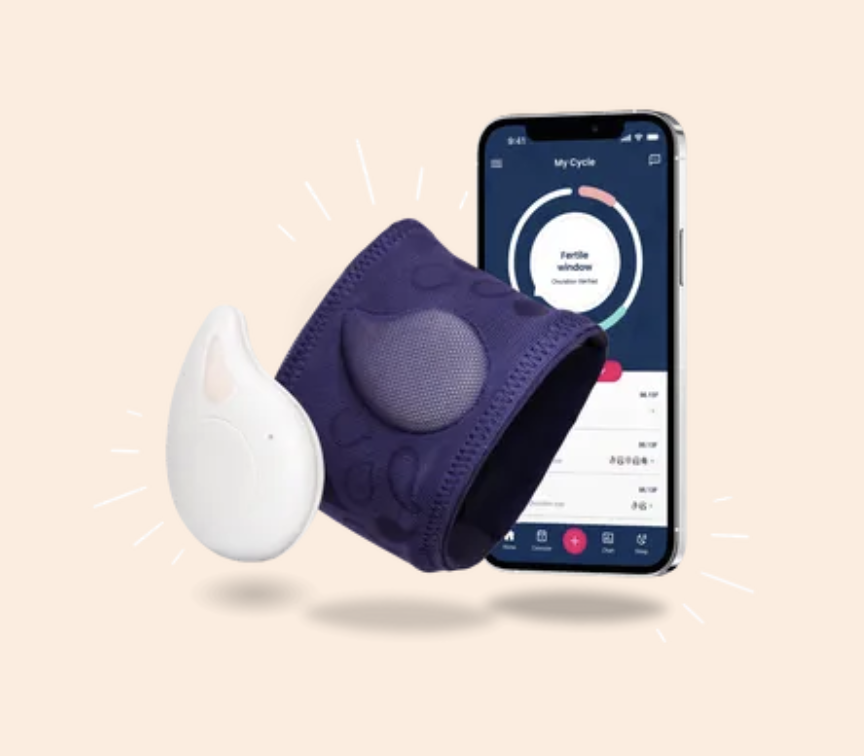
No alarm
needed — reads while you sleep
±0.05°C
measurement accuracy
3 hrs
minimum wear for a valid reading
6:00 am
consistent log time in Fertility Friend
Video Tutorial
Watch Before You Start
This official TempDrop tutorial walks through the full setup process, correct placement, and how to get the most accurate readings from your device. Watch this first, then follow the step-by-step instructions below.
Step-by-Step Setup
Getting Started with TempDrop
Tick each step as you complete it to track your progress.
0 of 6 steps completed
STEP 01📦
Unbox & Charge Your TempDrop
- Remove TempDrop from packaging — you will find the sensor, armband, and charging cable.
- Charge fully before first use. The LED will flash red while charging and turn solid green when complete (approximately 2–3 hours).
- Download the TempDrop app on your phone (iOS or Android) before proceeding.
STEP 02📱
Set Up the TempDrop App
- Open the TempDrop app and create your account.
- Follow the in-app pairing instructions: enable Bluetooth on your phone, then hold the TempDrop sensor near your phone until it appears in the app.
- Enter your personal details including your typical sleep schedule — this helps the algorithm calibrate to your patterns.
- Select your cycle tracking method (BBT / Fertility Awareness Method).
TIPAllow the app all requested permissions (Bluetooth, notifications) for seamless syncing.
STEP 03💪
Wear It Correctly
- Slide the TempDrop sensor into the armband pocket so the sensor face sits flat against your inner upper arm (not the outer arm).
- Position the armband on your non-dominant arm, approximately 5–8 cm above the elbow crease.
- The band should be snug but not tight — you should be able to slide one finger underneath.
- Wear it every night, including weekends and during your period. Consistency is essential for the algorithm to work.
TIPThe sensor needs skin contact throughout the night. If it slides, try tightening the band slightly or repositioning higher on the arm.
STEP 04🌙
Wearing It While You Sleep
- Put TempDrop on before you go to sleep — ideally at the same time each night.
- You do not need to wake at a specific time. The sensor records continuously and the algorithm selects the most representative temperature from your sleep data.
- The sensor is waterproof — you can wear it in the shower when you wake up if you forget to remove it.
- A minimum of 3 hours of wear is required for the algorithm to generate a reading. Aim for a full night.
STEP 05☀️
Syncing Your Reading Each Morning
- When you wake, open the TempDrop app and tap 'Sync'.
- The sensor will transmit overnight data via Bluetooth — this takes 10–30 seconds.
- Your calculated BBT reading will appear on screen. This is the temperature you will log in Fertility Friend.
- If the sync fails, keep the sensor near your phone and try again. Ensure Bluetooth is on.
TIPSync before getting up and moving around — it does not affect the reading but keeps your morning routine consistent.
STEP 06🔋
Charging & Maintenance
- TempDrop battery lasts approximately 1–2 months depending on use. The app will notify you when the battery is low.
- Charge using the magnetic USB cable — attach it to the gold charging pins on the back of the sensor.
- Wipe the sensor clean with a damp cloth if needed. Do not submerge in water for extended periods.
- Update the app when prompted to ensure the algorithm remains current.
Logging Your Data
How to Log in Fertility Friend
TempDrop gives you your BBT reading — Fertility Friend is where you chart it. Follow these steps every morning after syncing your TempDrop.
Always log at 6:00 am — every day
Because TempDrop measures continuously overnight, you do not need to wake at a set time. However, Fertility Friend requires a consistent time entry to keep your chart accurate. Always input 6:00 am as the temperature time, regardless of when you actually woke up.
1
Open Fertility Friend and go to today's chart entry
Tap the thermometer icon or navigate to Today → Add Data.
2
Enter your TempDrop reading as the BBT temperature
Type in the exact temperature shown in the TempDrop app after syncing.
3
Set the time to 6:00 am — every day, consistently
Fertility Friend uses the logged time to assess consistency. Always enter 6:00 am regardless of when you actually woke. This prevents the app from flagging your readings as inconsistent and keeps your chart clean.
4
Do not check 'woke early' or 'woke late' unless clinically relevant
Because TempDrop corrects for sleep disturbances algorithmically, you do not need to use these flags. Only use them if you had a genuinely unusual night (e.g. illness, very poor sleep).
5
Add any relevant observations (cervical mucus, LH strip result, symptoms)
The more data you add, the more useful your chart becomes for identifying your fertile window and confirming ovulation.
6
Save the entry
Your chart will update automatically. Over several cycles, Fertility Friend will begin to identify patterns and predict your fertile window.
Why This Matters
Why We Always Log at 6:00 am
Fertility Friend flags time inconsistency
If you enter 5:30 am one day and 8:00 am the next, Fertility Friend may mark readings as potentially affected by time variation — adding noise to your chart that makes ovulation confirmation harder.
TempDrop already corrects for wake time
Unlike a traditional oral thermometer, TempDrop does not require you to measure the moment you wake. Its algorithm selects the most stable temperature window from your overnight data — so the wake time is irrelevant to accuracy.
Consistency creates a cleaner chart
A consistent 6:00 am entry across all days means Fertility Friend can compare readings on equal footing, making the pre- and post-ovulatory temperature shift clearer and easier to confirm.
It simplifies your routine
Entering the same time every day removes one decision from your morning. Sync TempDrop, note the reading, open Fertility Friend, enter the temperature at 6:00 am — done.
Troubleshooting
Common Questions
My reading seems higher or lower than expected
Allow 2–4 weeks for the TempDrop algorithm to calibrate to your individual sleep patterns. Early readings may appear slightly off — this is normal.
The app says 'insufficient data'
This occurs if you wore the sensor for fewer than 3 hours. Ensure you are wearing it for a full night's sleep.
My chart in Fertility Friend looks erratic
Check that you are consistently entering 6:00 am as the time. Also ensure you are syncing TempDrop every morning without skipping days.
The sensor isn't syncing
Ensure Bluetooth is enabled, the app is open, and the sensor is within 1 metre of your phone. If it still fails, try closing and reopening the app.
I slept poorly — will my reading be accurate?
TempDrop's algorithm is designed to account for sleep disturbances, restlessness, and waking. It selects the most stable temperature window from your overnight data, so a disrupted night is less likely to affect accuracy than with a traditional oral thermometer.
Questions about your chart or temperature patterns? Bring your Fertility Friend chart to your next consultation.
Back to Resource Hub